Carstream on Android 16: Does It Work? (2026 Guide)
AAbrowser was built specifically for Android 16 and above and provides the same YouTube mirroring, screen mirroring, and app mirroring features.

Carstream is not compatible with Android 16. This page covers the confirmed status, why it stopped working, what errors you will see, and how to get YouTube back on Android Auto with AAbrowser.
Android 16 changed platform-level permissions that Carstream relies on to run inside Android Auto. No Carstream APK version - including the latest v2.0.7 - can work around this. AAbrowser was built specifically for Android 15 and above and provides the same YouTube mirroring, screen mirroring, and app mirroring features.
Why Carstream Stopped Working on Android 16
Android 16 introduced stricter controls over how sideloaded applications interact with the Android Auto framework. Specifically, Android 16 tightened the background overlay permissions and the accessibility service access that Carstream uses to render content inside Android Auto's interface.
These restrictions are enforced at the OS level, not by the Android Auto app itself. That means no Carstream APK update can bypass them. The restrictions apply to any app using the same method Carstream uses to run on Android Auto.
AAbrowser uses a different technical approach that is fully compliant with Android 16's permission model. That is why it works where Carstream cannot.
Compatibility at a Glance
Error Messages on Android 16
If you try to run Carstream on Android 16, you will see one of the following errors. None of them can be resolved - they confirm Carstream is not compatible with your Android version.
"Carstream is not compatible with your device"
Cause: Android 16 OS-level permission block
This appears during install or first launch. It is not a settings issue - Android 16 is blocking Carstream at the system level. Fix: uninstall Carstream and install AAbrowser instead.
"App not found" in Android Auto after Carstream install
Cause: Android 16 blocks Carstream from registering with Android Auto
Carstream installs successfully but does not appear in the Android Auto app list. Re-enabling Developer Mode or reinstalling will not fix this. Switch to AAbrowser, which registers correctly with Android Auto on Android 16.
"Overlay permission denied" on Carstream launch
Cause: Android 16 revoked overlay access for sideloaded apps using Carstream's method
Even if you manually grant overlay permission in Android settings, Carstream cannot use it on Android 16 due to deeper API restrictions. This is not fixable via permissions. Use AAbrowser.
Carstream crashes immediately on Android Auto connection
Cause: Android Auto API changes in Android 16 break Carstream's session initialization
The crash occurs before Carstream can render any content. No version of Carstream APK resolves this on Android 16. Install AAbrowser as the replacement.
Wireless Android Auto Behavior on Android 16
Carstream has no wireless Android Auto behavior on Android 16 - it does not run at all. The following covers how AAbrowser behaves over wireless Android Auto on Android 16, since that is the correct app for this OS version.
Wireless connection stability
AAbrowser maintains a stable wireless Android Auto connection on Android 16. Most devices connect and hold session without drops during active use.
WorksYouTube playback over wireless
YouTube video playback via AAbrowser works over wireless Android Auto on Android 16. No additional configuration needed beyond the initial AAbrowser setup.
WorksReconnection after screen lock
On some Android 16 devices, locking the phone screen during a wireless session may require manually reopening AAbrowser on the head unit. This is an Android 16 background process behavior.
Occasional issueFirst-time wireless pairing
Wireless pairing setup with AAbrowser on Android 16 follows the standard Android Auto wireless process. No extra steps are needed compared to Android 15.
WorksApp Mirroring Behavior on Android 16
App mirroring on Android 16 requires AAbrowser. Carstream's mirroring capability is not available on Android 16 for the same reasons outlined above.
Screen mirroring
AAbrowser mirrors your phone screen to the car's Android Auto display on Android 16. Latency is comparable to Android 15 on most devices.
Works via AAbrowserFirst-time wireless pairingThird-party app mirroring
AAbrowser can mirror third-party apps to Android Auto on Android 16. Grant overlay and accessibility permissions on first launch for full functionality.
Works via AAbrowserPermissions required
Android 16 requires explicit approval of overlay permission and accessibility service access for AAbrowser. Both prompts appear during first launch - approve both to enable full mirroring.
Setup step requiredAudio passthrough
Audio from mirrored apps passes through to the car speakers correctly on Android 16 via AAbrowser. No audio routing issues reported on Android 16.
WorksHow to Set Up AAbrowser on Android 16
-
1
Visit the Website and Activate the Plan
Open your mobile browser and go to https://aastore.carstream.app/ .
After scanning, tap the link that appears on your phone.
Follow the on-screen instructions to add or install AAStore on your Android device.
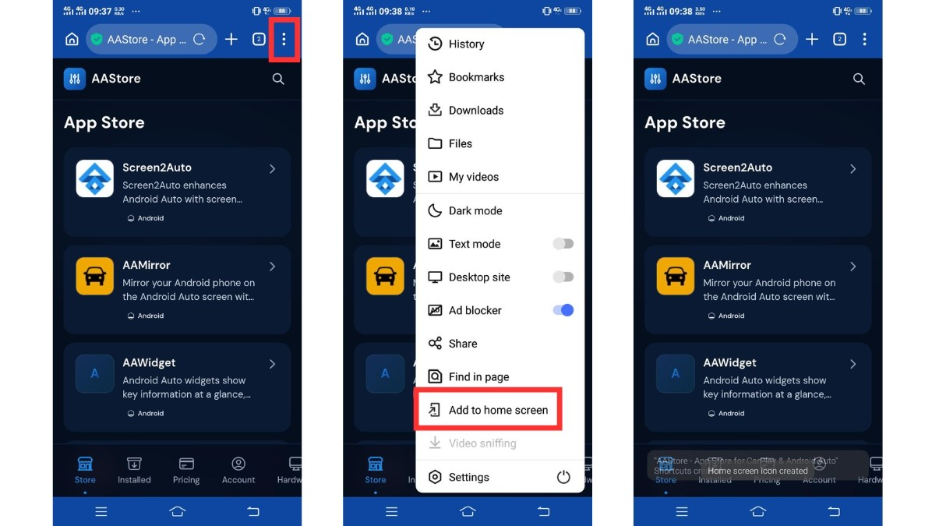
Choose the AAStore plan that matches how many apps you want to activate and complete the one-time purchase.
After, Go to the Account tab > Enter the email address you used during checkout and tap Verify.
After verification, your plan will activate, and your app slots will unlock.
-
2
Find AAbrowser
Use the search option on the website to find the AAbrowser APK file.
-
3
Download and Install the APK
Download the AAbrowser APK file to your Android phone.
Open the downloaded APK file and tap Install.
-
4
Connect Android Auto
Connect your phone to your car using USB or wireless Android Auto.
-
5
Open AAbrowser
On your car display, open Android Auto and select AAbrowser from the app list.
-
6
Open YouTube
Inside AAbrowser, visit youtube.com and start playback only while safely parked.
More Compatibility Guides
Full Android compatibility overview - all versions
SetupHow to set up Carstream on Android Auto from AAstore
Android 14CarStream on Android 14 - Use CarStream
Android 15CarStream on Android 15 - Use CarStream
Android 17CarStream on Android 17 - Use AAbrowser
Ready to Get YouTube Back on Android Auto?
Download AAbrowser - the correct solution for Android 15 and above. Available at the same store as Carstream.
Download AAbrowser APK →On Android 14 or below? Download Carstream instead.
FAQs: Carstream on Android 16
Does Carstream work on Android 16?
No. Carstream APK is not compatible with Android 16. Android 16 changed the platform-level permissions that Carstream needs to run inside Android Auto. No version of Carstream - including v2.0.7 - works on Android 16. Use AAbrowser instead, available at aastore.aabrowser.app.
Why did Carstream stop working after I updated to Android 16?
Android 16 tightened background overlay and accessibility permissions for sideloaded apps interacting with Android Auto. Carstream relies on these permissions to function, and Android 16 blocks them at the OS level. This cannot be fixed by reinstalling Carstream or changing settings. Switch to AAbrowser, which uses a permission model that is fully compatible with Android 16.
Does AAbrowser support wireless Android Auto on Android 16?
Yes. Wireless Android Auto works with AAbrowser on Android 16. Pairing and connection follows the standard wireless Android Auto process. On some devices, you may need to manually reopen AAbrowser after locking the phone screen during a wireless session.
Can I mirror apps to Android Auto on Android 16?
Yes, via AAbrowser. Install AAbrowser from aastore.aabrowser.app, enable Android Auto Developer Mode, and grant overlay and accessibility permissions on first launch. Once set up, AAbrowser can mirror third-party apps to your car screen on Android 16.